Plans
Your plans are plain files. Your agents work straight from them.
Stories are files you already know how to edit: markdown with frontmatter, or rich HTML pages. CodeSense tracks their status, dependencies and sprints, and opens each story's worktree in its own repo.
Markdown or HTML, your choice per file
Your plans are plain files you already know how to edit: markdown with frontmatter, or rich HTML pages. There’s no database and no migration, and any extra key becomes metadata you can query. A story is a file whose frontmatter says type: story; in an HTML story the same fields are <meta name="cs:…"> tags. The files live in your git, and agents read and write them natively.
You or your agent write the stories; CodeSense reads them.
Create a story from the app, with a template and a repo picker, and open a real sample epic on first run.
---
type: story
story_id: LL-231
title: Cart summary tax breakdown
status: review
source_repo: ledgerline/web
depends_on: [LL-204]
sprint: sprint-14
points: 3
assigned_to: sam
---
An HTML story renders as the page you wrote.
<meta name="cs:type" content="story">
<meta name="cs:story-id" content="LL-222">
<meta name="cs:status" content="todo">
<meta name="cs:source-repo" content="ledgerline/web">
<meta name="cs:depends-on" content="LL-209, LL-231">
<meta name="cs:sprint" content="sprint-15">
<title>LL-222 — Wallet pay button</title>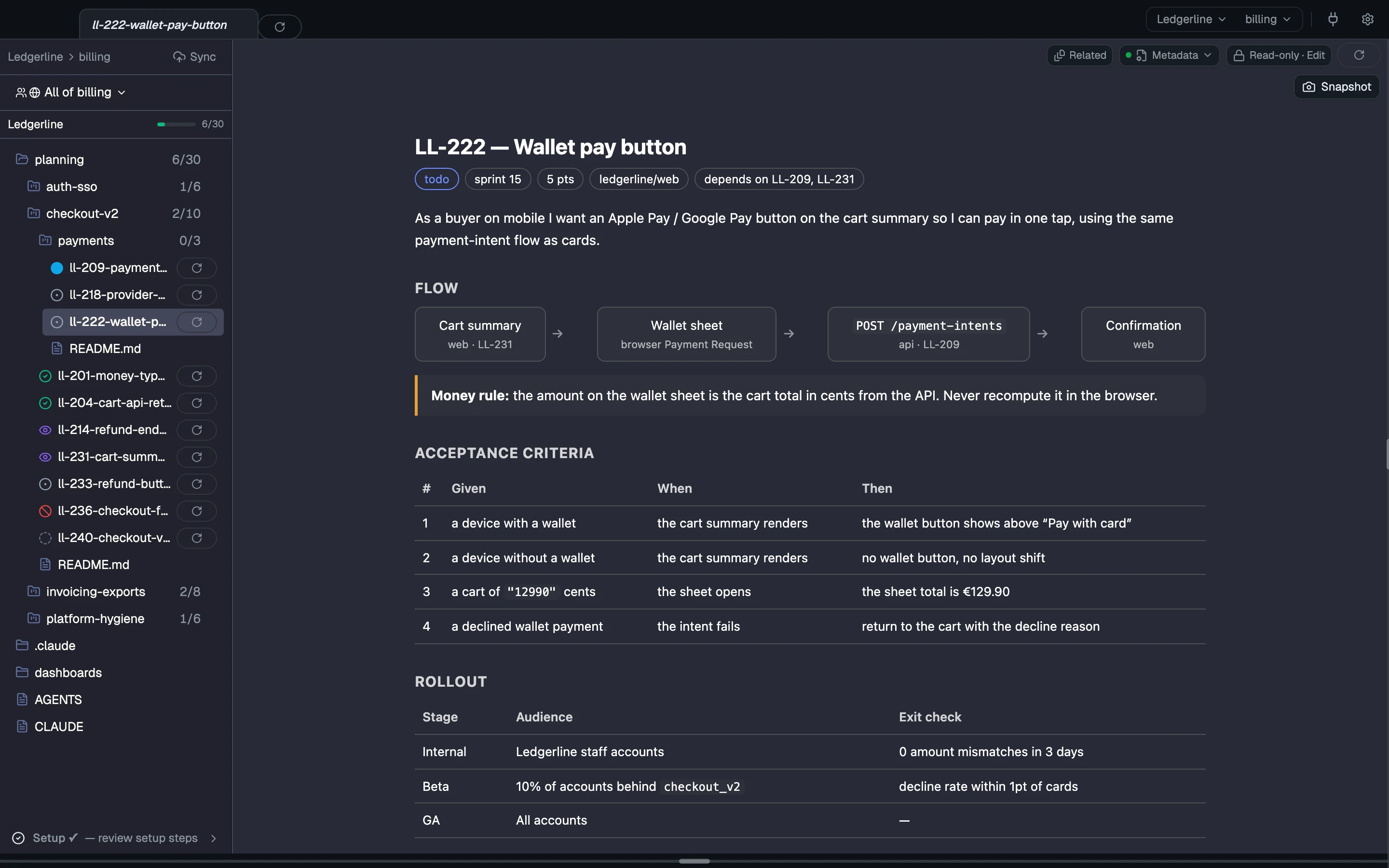
depends_on links stories across epics.
The left nav marks a story ready once everything it depends on is done. An epic is a folder with a main doc, and epics nest at any depth.
---
type: epic
title: Checkout v2
status: in-progress
repos: [ledgerline/web, ledgerline/api]
owner: maya
target: 2026-10-15
---
# Checkout v2Sprints, from the same files
Status, sprint and points are plain fields in the same story files. Sprints are a small config file in your git, and one sprint covers stories from every repo the team works in. A board is a pane you build that queries those fields.
Tag a story, or a whole epic, into a sprint from the nav menu. Plan and close sprints by editing one file, or ask an agent to.
sprints:
  sprint-12:
    state: closed
    goal: "Money model + invoice PDFs"
    focus_epics: [checkout-v2, invoicing-exports]
    start: "2026-08-17"
end: "2026-08-28"One click: a story opens in its own worktree, in its own repo
Launch a story’s agent from its card and it starts in the story’s own worktree and repo, with your team’s context landing there.
Each story opens in its own repo, with no manual cd or clone picking. If you haven’t added that repo yet, CodeSense asks you to first.
LL-214 names ledgerline/api, so its worktree opens there.
---
type: story
story_id: LL-214
title: Refund endpoint idempotency keys
status: review
source_repo: ledgerline/api
depends_on: [LL-209]
sprint: sprint-14
---Status is a field. Anyone can move it.
A story’s status is a field in its file. You or your agent can move it, and nothing in CodeSense blocks the move. A status outside your team’s list is kept and shown as drift.
Your folders, your statuses, your phases, your metadata.
Organize epics as folders however your team thinks. Each team lists its own statuses in status-taxonomy.yml. Any frontmatter key is metadata you can filter, group and show on a dashboard.
- planning/ /
- checkout-v2/ / epic
- README.md the epic's main doc
- ll-214-refund-endpoint-idempotency-keys.md
- ll-231-cart-summary-tax-breakdown.md
- payments/ / sub-epic
- README.md
- ll-222-wallet-pay-button.html an HTML story
- invoicing-exports/ epic
- platform-hygiene/ epic
- checkout-v2/ / epic
Coming next
Not shipped yet. Each item says what it's waiting on.
Read the concepts
How each part works, in the docs.
- The planning model Epics as folders, stories as files, fields as metadata.
- Dependencies and readiness How depends_on links stories, and when a story is ready.
- Stories and sprints Status as a field, sprint files, tagging stories into a sprint, and a board pane.
- Statuses and phases Per-team statuses, their roles, and how a status changes.
- Multi-repo One plan across repos, the right repo per story.